
As digital dentistry becomes part of everyday clinical workflows, dental practices are increasingly evaluating whether they should continue outsourcing physical models or bring production in-house. A dental model 3D printer can provide a practical way to produce models directly from digital patient data, while also supporting applications such as surgical guides, dentures, splints, and temporary restorations.
However, selecting a dental clinic 3D printer is not simply a matter of comparing resolution or printing speed. Clinics need to consider accuracy, ease of operation, available space, maintenance requirements, material compatibility, and how easily the printer fits into the existing digital workflow. For practices looking to establish a more efficient production process, understanding these factors can make the investment decision more straightforward.
Why Dental Clinics Are Considering In-House 3D Printing
Traditional model production often involves sending digital files to an external laboratory or production service. While outsourcing can remain useful for certain cases, it also introduces additional steps between scanning, design, production, and clinical use.
An in-house 3D printer for dental models can shorten this chain. Once a digital model is ready, the clinic can prepare the print and produce the physical model on site. This can be particularly useful when a model is needed for treatment planning, patient communication, appliance preparation, or chairside evaluation.
The benefit is not only speed. In-house production can also give dental teams greater visibility into the production process. If a model requires modification, the digital file can be adjusted and printed again without coordinating another external production request.
For clinics handling a growing number of digital cases, this level of workflow control can become an important operational consideration.
What Should You Look for in a Dental Model 3D Printer?
Printing Accuracy and Detail
Dental models can contain fine anatomical details that need to be reproduced consistently. A printer’s optical resolution, layer thickness, and overall printing stability therefore deserve careful attention.
For example, the AccuFab-Aris from SHINING 3D DENTAL uses a 4K LCD system with a stated 34 μm pixel size. Its adjustable layer thickness ranges from 50 to 125 μm. These specifications are designed to support detailed dental printing across models and other clinical applications.
Accuracy should also be considered together with repeatability. A printer that produces one accurate model but requires frequent manual intervention may not provide the same practical value as a system designed for consistent daily operation.
Ease of Setup and Operation
Not every dental practice has a dedicated technician responsible for 3D printing. A dental clinic 3D printer should therefore be straightforward to set up and operate.
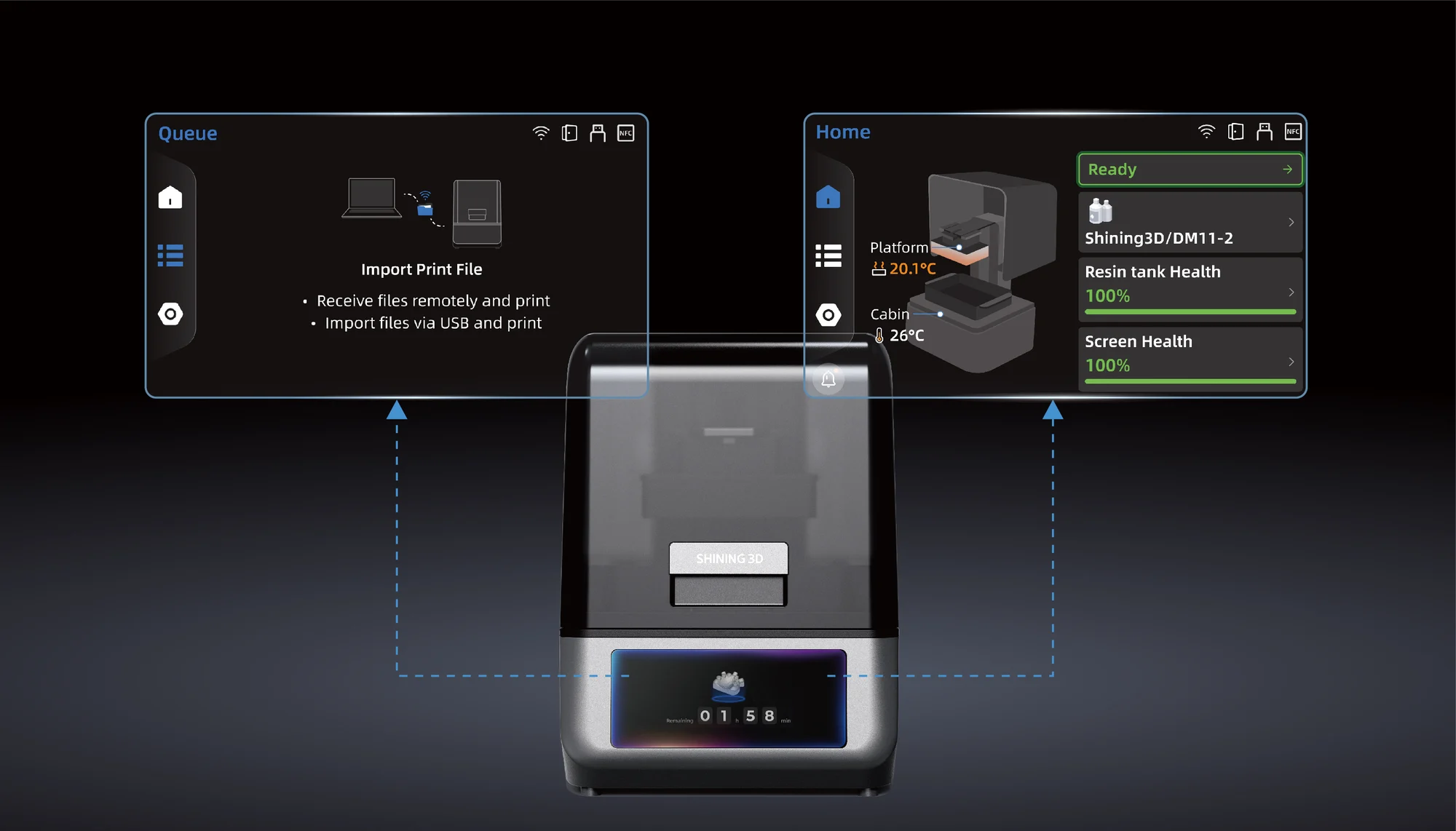
AccuFab-Aris is designed around a plug-and-print workflow. It supports one-click auto-leveling and automatic Z-axis calibration, reducing the need for manual setup. Its compact 8.5 kg design also makes it easier to accommodate within a clinical environment where workspace may be limited.
This type of automation can be particularly useful when clinicians or dental assistants need to operate the printer as part of their normal responsibilities rather than relying on a dedicated printing specialist.
Maintenance Matters as Much as Printing Performance
A printer used regularly in a clinic needs predictable maintenance. Resin handling, tank condition, platform cleaning, calibration, and failed prints can all affect productivity.
Modern dental printers increasingly incorporate monitoring and automation features to reduce avoidable operational errors. AccuFab-Aris, for instance, includes resin tank NFC detection and residue detection. Its health dashboard can also monitor the resin tank and screen lifespan.
The printer’s thermostatic build platform maintains a temperature of approximately 30°C, which is intended to reduce resin warping and the risk of print detachment. Such features can help create a more consistent printing environment and reduce unnecessary troubleshooting.
For a clinic evaluating an in-house system, these details are worth considering alongside headline specifications. A printer that is easy to maintain can have a meaningful impact on everyday workflow efficiency.
In-House Printing vs. Outsourced Dental Models
Outsourcing remains a practical option, especially when a practice has relatively low printing demand or requires specialized production. However, external production can involve file transfers, communication, shipping, and waiting periods.
An in-house 3D printer for dental models changes the workflow by moving physical production closer to the point of care. Digital scans can be prepared, designed, and printed without sending the case through a separate external production process.
This can be valuable when turnaround time matters. A clinic may need a model for same-day treatment planning, patient explanation, try-in procedures, or internal verification. Having a printer available on site provides more flexibility when these needs arise.
The right choice ultimately depends on case volume, available staff, production requirements, and the cost of outsourcing. Clinics should compare the complete workflow rather than looking only at the initial equipment price.
Beyond Dental Models: Supporting More Clinical Applications
A dental model 3D printer does not necessarily need to be limited to model production. A system that supports several applications can provide greater utility as a clinic’s digital workflow develops.
AccuFab-Aris is designed for dental models as well as restorations, dentures, surgical guides, and splints.
This broader application range allows clinics to consider how the printer may fit into future workflows rather than evaluating it only for one type of model.
The SHINING FLOW ecosystem further connects scanning, design, nesting, and printing. According to SHINING 3D DENTAL, digital scan data can be transferred through its cloud workflow, while automatic nesting and slicing prepare files for one-click printing with AccuFab-Aris.
Such integration can reduce unnecessary software switching and manual file handling, helping dental teams establish a more connected digital workflow.
How to Evaluate the Total Value of a Dental Clinic 3D Printer
Before selecting a printer, clinics should evaluate several practical questions.
How many models are currently outsourced each month? How long does external production usually take? How often are models needed urgently? Who will operate the printer? Is there enough space for the equipment and post-processing workflow? What materials and applications are required?
These questions provide a more realistic basis for comparing systems.
It is also important to consider connectivity and workflow compatibility. AccuFab-Aris supports USB, Wi-Fi, and Ethernet connections, while its specifications include a 130 × 80 mm printing platform, 60 mm/h stated print speed, and 200 mL resin tank volume.
Instead of selecting a printer based on a single specification, clinics should assess how the complete system performs within their daily working environment.
Building a More Practical Digital Dental Workflow
The purpose of adopting a dental model 3D printer is not simply to add another piece of equipment to the clinic. Its value comes from how effectively it connects digital data with physical production.
For practices seeking greater control over turnaround times and model production, an in-house dental clinic 3D printer can provide a practical alternative to relying entirely on external production. With appropriate software, materials, scanning equipment, and post-processing, the printer can become part of a connected digital workflow rather than functioning as an isolated device.
SHINING 3D DENTAL approaches this workflow through an ecosystem covering scanning, design, printing, and post-processing. AccuFab-Aris is positioned as a compact dental printer for daily clinical use, combining automated setup, monitoring features, and multi-application capabilities.
For clinics considering a 3D printer for dental models, the most suitable solution is ultimately the one that matches actual case volume, clinical applications, available workspace, staff capabilities, and desired turnaround time. Evaluating the entire workflow rather than one technical specification can make the transition to in-house digital production more predictable and sustainable.